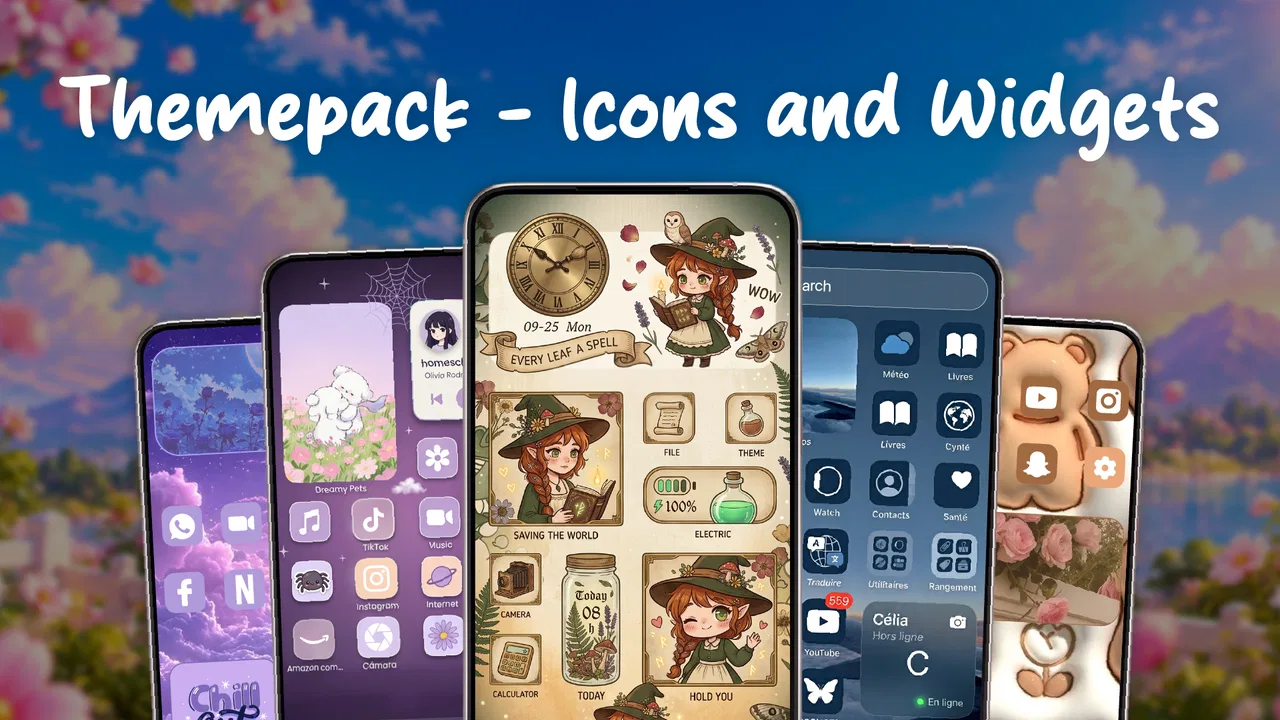
Themepack - Icons and Widgets
- 4.6
- Rating
- 500.00K
- Installs
- Free
- Price
 Analysis by App-foxy
I spent time with Themepack - Icons and Widgets as a personalization app rather than treating it like a full phone replacement. Its purpose is straightforward: give your Android home screen a more deliberate look through icons, themes, and widgets. That sounds simple, but the real question is whether the convenience is worth adding another customization layer to a phone you can already adjust on its own.
My overall impression is positive for people who want a quick visual refresh without learning a complicated launcher. The app is made by App Craze, is free to install, and is aimed at an Everyone audience. It runs on Android 8.0 and later, so it is accessible to a wide range of devices, including phones that are no longer among the newest models. The current release is version 69.0, and the app has passed half a million installs with a 4.6 average from roughly four and a half thousand ratings.
How Themepack fits into everyday phone customization
Themepack sits in the personalisation category, but I would describe it as a convenience tool more than a complete home-screen system. Instead of manually hunting for matching icons, backgrounds, and widgets, you use one place to shape the appearance of your phone. That makes it especially appealing when the default launcher feels visually dull but you do not want to replace the way your phone behaves.
You May Also Like

 Blood Strike: 2.5 Anniversary
Blood Strike’s Loadouts Turn Every Drop Into a Tactical Gamble
A close look at Blood Strike’s custom loadouts: how fast access to signature weapons reshapes its battle royale rhythm, rewards preparation, and narrows the gap between fights.

 Pandora - Music & Podcasts
Pandora’s Music Is Easy to Start, but Harder to Recover
Pandora’s strength is its low-effort path from a seed to a station. Its weak spot is how much confidence it asks you to place in connection, setup, and quiet recovery.

 8 Ball Pool
8 Ball Pool Is Built on Rivalries, Rematches, and Routine
A close look at the rivalries, rematches, shared routines, and unanswered safety questions that turn a quick pool match into a persistent mobile community.

 Samsung Music
Samsung Music’s Quiet Strength Is Playing What You Already Own
Its reach comes less from spectacle than from dependable access to a personal library. That simplicity is both the app’s strongest retention engine and its ceiling.

 AccuWeather: Weather Radar
AccuWeather Review: A Quick, Clear Forecast for Everyday Decisions
For everyday plans, the best forecast is the one you can understand quickly. AccuWeather makes rain timing, radar, and local conditions easy to act on, with a few trade-offs.

 Hill Climb Racing
Why Hill Climb Racing Still Turns Crashes Into One More Run
A tiny car, a bumpy hill and one more upgrade: Hill Climb Racing keeps resurfacing because its simple chaos makes every near-miss feel personal.
More From Our News Desk



In my experience, the strongest reason to try it is speed. A person who wants a cleaner home screen can make a noticeable change without spending an evening comparing separate icon packs and widget tools. The store summary focuses on customizing a phone easily, and that is the right expectation: this is about reducing the effort involved in making the screen look coordinated.
The app is also a practical option for someone who changes phones regularly. A carefully built home screen can take time to recreate, while a themed approach gives you a starting point. I would still expect some manual adjustment after moving between devices, because launchers and screen layouts do not always handle customization in exactly the same way. Even so, having icons and widgets organized around one visual idea is more convenient than rebuilding the look from unrelated sources.
What the free access means in practice
The app itself is free, which makes trying it a low-risk decision. That matters in this category because screenshots can be persuasive while the actual style may not suit your phone. You can explore the experience before deciding whether it deserves a permanent place on your device.
There are in-app purchases ranging from $0.99 to $19.99 per item. I would therefore separate “free to install” from “everything is free.” The free entry point is useful for testing the design direction and deciding whether the workflow feels comfortable. Paid items may make sense for someone who finds a particular visual style worth paying for, but I would not buy anything immediately just because a preview looks attractive.
This pricing structure also changes how I judge value. The app does not need to replace every customization tool to be worthwhile. If the free experience gives you enough to make your home screen feel better, it can already serve its purpose. If the designs you prefer are behind purchases, the decision becomes personal: you are paying for saved time and a consistent appearance, not for a necessary phone function.
The value is in coordination, not just decoration
Icons alone rarely transform a phone if the rest of the screen remains crowded. The useful combination here is the ability to think about icons, themes, and widgets together. A restrained arrangement can make frequently used apps easier to recognize, while a widget can provide information without forcing you to open another app.
One everyday scenario shows where this helps. Imagine I am leaving for work and want a home screen that shows my calendar or another important glanceable item, keeps navigation and messaging easy to reach, and avoids a wall of unrelated app colors. A coordinated theme can make that first screen feel intentional. The benefit is not that the phone performs a new task; it is that I spend less time searching through visual clutter.
Another useful approach is to create a screen for a specific mood or routine. A calmer arrangement for reading and music may be more pleasant in the evening, while a practical first page can prioritize calls, messages, maps, and work tools during the day. I would not assume the app automatically builds perfect routines for you, but its customization focus makes this kind of visual planning easier than relying only on the default launcher.
Three details that affect the experience more than expected
First, I would choose the launcher before investing much effort in a design. Icon customization can depend on how a device handles home-screen replacements, shortcuts, and themed elements. If your phone uses a heavily modified Android interface, some parts of the visual result may feel less uniform than they appear in a preview. Testing one small area first is smarter than redesigning every page immediately.
Second, widgets should be treated as part of the layout rather than as an afterthought. A widget that looks good in isolation can consume valuable space or make icons feel uneven. I found that starting with one useful widget and leaving breathing room around it produces a more polished result than filling every empty section.
Third, consistency matters more than the number of choices. It is tempting to keep switching themes, but a home screen usually feels better when the icon treatment, widget style, and background support the same visual direction. I would compare a few options, select one that remains readable in normal lighting, and then judge it after a day of actual use rather than only from the setup screen.
Where the app is less convenient
The main trade-off is that personalization adds another layer between you and the default Android experience. Even when the result looks better, you may need to adjust placements, check whether every frequently used app is represented properly, and decide how much visual change you really want. Someone who prefers a completely stock interface may see this as unnecessary maintenance.
There is also a difference between a beautiful preview and a practical home screen. Decorative icons can be less immediately recognizable than familiar app logos, particularly when several symbols share the same shape or color. I would prioritize legibility over novelty. If you regularly open apps quickly by sight, an elaborate theme may slow you down until your muscle memory catches up.
The purchase range is another point to consider. Since items can cost from $0.99 up to $19.99, the app can be inexpensive for casual experimentation but considerably more costly if you keep collecting premium designs. I would set a personal limit before browsing deeply. That keeps a free customization experiment from turning into an unplanned series of small purchases.
Compared with using only the phone’s built-in wallpaper and icon settings, Themepack should offer a more focused route to a coordinated appearance. Compared with a full third-party launcher, it is the more approachable choice if your priority is visual styling rather than changing gestures, app drawers, or detailed navigation behavior. A launcher is better for someone who wants to redesign how the phone works; this app is better for someone who mainly wants the home screen to look different.
Who will get the most from it
I think the best audience is people who enjoy personalization but do not want to assemble a toolkit from several unrelated apps. It also suits users who have just bought a phone and want to make it feel more personal, or anyone whose current layout has become messy after months of installing and removing apps.
It can be useful for a family member who wants a friendlier screen, provided the chosen design keeps labels and icons easy to identify. The Everyone rating makes it broadly approachable, but age suitability does not automatically mean every theme is equally practical for every user. Readability, contrast, and simplicity still matter more than decorative appeal.
I would be more cautious about recommending it to power users who already have a carefully tuned launcher setup. If you rely on advanced gestures, highly specific grid controls, or a deeply customized workflow, a dedicated launcher may provide more control. The same applies to people who want one exact icon for every app and are willing to manage everything manually. Themepack’s advantage is convenience, not unlimited precision.
It is also not the right choice if you dislike recurring visual decisions. Customization apps can encourage constant tweaking, and that is not useful for everyone. If your current home screen is fast, clear, and comfortable, changing it may create more work than value. The free installation makes testing sensible, but it does not obligate you to keep the result.
My practical way to test it
I would begin with a backup or screenshot of the current home-screen arrangement so returning to it is easy. Then I would apply one theme or icon direction to the main page, add only the widget I actually need, and use the phone normally for a full day. That test reveals problems that a setup preview hides: hard-to-read icons, awkward spacing, or a widget that pushes important shortcuts too far down.
After that, I would customize secondary pages rather than changing everything at once. Keep communication, navigation, and essential tools in familiar positions, and use the more expressive styling on pages for entertainment, reading, or personal interests. This approach gives the app room to improve the phone without making basic tasks feel unfamiliar.
I would also wait before making a paid purchase. Because the free app lets you evaluate the general workflow, there is little reason to buy on impulse. First decide whether the designs remain attractive after repeated daily use. If they do, a low-cost item may be reasonable. If the style becomes tiring or the layout causes friction, spending more will not solve the underlying mismatch.
My verdict on the value
Themepack - Icons and Widgets is worth trying when convenience matters more than deep control. It gives Android users a simple path toward a more unified home screen, and the free starting point makes that experiment accessible. Its strongest value comes from bringing visual elements into one customization experience instead of asking you to build a design from separate tools.
My recommendation is more measured when paid content enters the decision. The listed purchases cover a wide range, so the value depends on whether a specific design genuinely improves your daily use. I would pay for a style I continued to enjoy and found easy to navigate, but I would skip purchases made only for novelty.
In the end, I see this as a friendly personalization app rather than a replacement for serious launcher software. It is a good match for a cleaner, more coordinated screen and a poor match for users seeking total behavioral control. If your phone feels visually stale and you want a low-commitment way to refresh it, I would start with the free experience. If your current launcher already gives you the exact layout and gestures you need, keeping things as they are may be the better choice.
For me, that balance makes the app easy to recommend selectively. It delivers the most when you approach it with one practical goal—improve recognition, reduce clutter, or create a calmer first screen—instead of endlessly collecting themes. Used that way, it can make an ordinary Android home screen feel more personal without turning customization into a project.
FAQs for Themepack - Icons and Widgets
01What is Themepack - Icons and Widgets, and what can I use it for?
Themepack - Icons and Widgets is an Android customization app designed to change the appearance of your home screen. It typically combines themed icon packs, wallpapers, widgets, and matching visual elements so you can create a more consistent style. It is useful for users who want to personalize their phone without manually designing every icon or searching for separate resources.
02Is Themepack - Icons and Widgets compatible with every Android phone and launcher?
Compatibility can vary depending on your Android version, device manufacturer, and the launcher you use. Many icon packs work best with popular launchers that support custom icons, while some manufacturer launchers may offer limited support. Before downloading, check the app listing for supported Android versions and launchers. You may need to install or switch to a compatible launcher for all features to work correctly.
03Does Themepack - Icons and Widgets change the entire phone interface automatically?
The app mainly focuses on home-screen customization rather than replacing the complete Android interface. Depending on the selected theme, you may be able to apply icons, wallpapers, and widgets, but settings screens, notification panels, and other system areas usually remain unchanged. Some elements may require manual placement or configuration, so the final result can depend on your launcher and the level of customization you choose.
04Is Themepack - Icons and Widgets free to download, and are there in-app purchases or advertisements?
The app may be free to install while offering additional themes, icon collections, widgets, or premium customization options through in-app purchases. Advertisements may also appear, particularly when browsing or applying free content. Pricing and available features can change over time, so review the current Google Play listing before downloading. Also check whether subscriptions or one-time purchases are required for the specific designs you want.
05Will using Themepack - Icons and Widgets affect my phone’s performance or battery life?
For most devices, applying a static icon pack or wallpaper should have little effect on performance. However, animated wallpapers, frequently updating widgets, and background services may use additional memory, processing power, or battery. If your phone becomes slower or battery consumption increases, remove unnecessary widgets, disable animated effects, or return to a simpler theme. Performance will also depend on your device’s age and available resources.
Pros
- Large collection of stylish icons
- wallpapers
- and widgets
- Supports many popular Android launchers for easy customization
- Regular content updates keep the design library fresh
- Icon request tools help cover apps missing from the catalog
- Widgets add a cohesive look beyond simple icon replacement
Cons
- Some premium packs and features require an additional purchase
- Certain icons may not match less popular or newly released apps
- Full customization can take time when applying several elements
- Launcher compatibility may vary across devices and Android versions
- Widgets may use extra battery or system resources when active

Themepack - Icons and Widgets
Gallery